Apps, subscriptions and what stops working offline
Every one of these machines still moves without the internet. What you lose is the map, the schedule, the history and, on some of them, the reason you paid extra.
All four categories keep their core function without a network: a robot vacuum cleans from its own button, a litter box cycles on its own sensors, a pool cleaner runs the mode it was last given, and a mower keeps its saved boundary. What goes is everything built on a map or a log, and on mowers the boundary itself needs the app to draw. Only two things here carry a real recurring fee: Whisker's video and history tier, and cellular data plans on some mowers.
Model by model: our data study scores every robot we track on whether it starts with no app and keeps working with no internet, from each maker's own words.
- The rule that holds across all four
- Robot vacuums: the map is the product
- Cameras: what actually leaves the house
- Mowers: the boundary, the satellites and the data plan
- Litter boxes: the box cleans without the app, the history needs it
- Pool cleaners: the app is the least load-bearing of the four
- What stops, by category
- Who charges a recurring fee, and for what
Robots that work with no app or internet
Want a robot that keeps working if the app or the internet goes away? Our offline study picks these, one per type, from each maker’s own words.

Robot vacuum
eufy 11S Max
Its maker says it starts with no app and keeps working with no internet.

Litter box
Its maker says it starts with no app and keeps working with no internet.
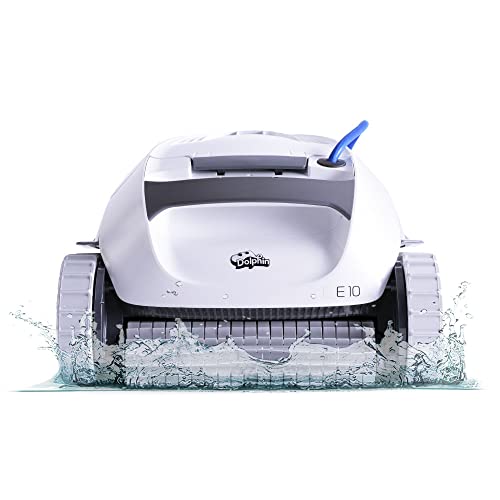
Pool cleaner
Dolphin E10
Its maker says it starts with no app and keeps working with no internet.
The rule that holds across all four
The machine does the physical job on its own hardware. The app does the memory. That split explains almost every answer below: sensors, brushes, blades and cycles keep working offline, while maps, schedules, room names, no-go zones, history, weight trends and firmware updates all live on the other side of a Wi-Fi connection.
Two exceptions are worth knowing before you buy. The first is setup: Roborock's own product-page terms say use of this product requires the Roborock app, and that the product will not function as intended without downloading the app and agreeing to the app's terms and conditions. The second is mowers, where the boundary is drawn in the app rather than laid in the ground.
One practical detail catches more first-day setups than anything else. Every brand here runs on 2.4 GHz only. Roborock says its robots currently only support the 2.4 GHz Wi-Fi band and do not support 5 GHz at present. eufy says eufy devices only support 2.4 GHz Wi-Fi. Ecovacs adds that enterprise networks are not supported either.
Robot vacuums: the map is the product
A robot vacuum will clean with no network at all. Roborock's support FAQ answers it directly: yes, the robot cleaner can operate without Wi-Fi and perform full-home cleanups. iRobot lists three ways to start cleaning, and the first is one press on the robot's start button. Ecovacs' manual says you can tap a button on the robot to start cleaning, and that basic functions stay available for manual operation while smart features need the app.
What you lose is everything the map enables: room-by-room cleaning, no-go zones, schedules and firmware updates. iRobot's app page describes the app as where you start, stop or schedule the robot, adjust cleaning settings, customize detailed maps of your home and create cleaning routines.
The map itself mostly does not live on the robot. Ecovacs' app privacy policy states that the 2D or 3D map generated by the device is among the information stored at its servers, that 3D Maps is active by default and is necessary to operate the device in your home, and that it retains the maps until they are overwritten by a newer version, the device recognises it is in a new home, or you cancel your account. Shark says mapping data from your robot is sent to the SharkClean app. iRobot frames it as a choice, saying that through the settings in your app you may choose not to transmit map data.
Cameras: what actually leaves the house
The makers give genuinely different answers here, and the difference is worth reading before you put a camera in a bedroom.
Shark states that images and videos from the camera on models equipped with a camera are processed on the device to aid navigation and stay on the machine, apart from a voluntary testing programme run with participant consent. Roborock says the Saros 10R ensures no images are stored, and that on the Saros Z70 all camera functions are switched off by default and only work when you allow it. iRobot's privacy policy says images will not be viewable by iRobot unless and until you opt in both to image collection and to sharing each image.
Ecovacs is the most explicit that pictures leave the home. Its app privacy policy says pictures are stored on the device and are also encrypted, transmitted and stored on cloud servers located in the United States, and that only if the artificial intelligence is also unable to identify the object, the image may be manually reviewed by employees from a related company located in the People's Republic of China. The same policy says the device blurs areas where it detects the shape of a human body.
Mowers: the boundary, the satellites and the data plan
This is the category where the app is not optional. A wire-free mower learns its boundary by being driven around the lawn from the phone. Greenworks describes the AiMowbot as a wire-free solution controlled by the app in your smart device, where you virtually mark the perimeter by driving the mower around it using the app. Lose the app afterwards and the saved boundary stays, but changing a zone means getting the phone back out.
Positioning is the second dependency, and the makers have moved it off your property. Navimow's i2 AWD page says that with Network RTK support there is no need to install any local antenna, which means the correction signal arrives over a cellular link. That is what a data plan pays for, and the plans differ sharply. Segway Navimow states on the X4 that Network RTK access is included at no extra cost and required cellular data are provided free of charge, and Worx advertises lifetime free RTK Cloud service. Mammotion sells 4G service as a 3-month or 12-month plan, while saying it is not mandatory because you can use antenna over datalink mode instead.
What the plan gates matters more than the price. Mammotion's terms list what the service buys, including timed operations, start and stop commands, map and battery queries, and the anti-theft function as a location query. Ecovacs states the offline case plainly: the GOAT can work without Wi-Fi for basic operation, but you may lose app features like network setup, mapping and advanced mowing controls.
Litter boxes: the box cleans without the app, the history needs it
A self-cleaning litter box is the most independent machine of the four, because what triggers it is a sensor under the cat rather than a command from a phone. Neakasa states the offline case outright for the M1: if the network is disconnected, it will continue to work according to your previous settings. PETKIT builds a physical answer into the Purobot Max 3, saying the top panel handles the essentials without the app.
What the app adds is the record, and in a multi-cat house the record is the point. Whisker's app page describes real-time insight into litter box activity and weight trends, notifications when the waste drawer is full, and the ability to start a clean cycle remotely. On the Litter-Robot 4, SmartScale tracks weight data about each individual cat and gives a seven-day view of visits. A cat that stops using the box, or quietly loses weight, shows up there and nowhere else.
This is also the category with a real subscription. Whisker+ renews at $7.99 a month, or $79.90 paid up front for the year, and buys up to two years of cat activity history and unlimited video streaming; without it, Whisker says you can still watch live video for up to 5 minutes daily. PETKIT gates video the same way, telling Purobot Ultra owners to upgrade to PETKIT Care+ for 30-day video history.
Pool cleaners: the app is the least load-bearing of the four
Several pool robots have no app at all, and the spec table says so. Maytronics lists mobile application as No for the Dolphin Nautilus AG, and Hayward's corded robotic cleaners advertise no connected feature.
Where there is an app, it is a remote control rather than a dependency. Wybot's FAQ describes the flow for its cordless machines: there is no start cleaning button on the page, so after customising your cleaning need you just close the app and put the robot into the pool. Beatbot's FAQ says the robot can work without Wi-Fi and that the modes on the robot can cover the cleaning of all areas.
The reason the app cannot be load-bearing here is physics. Wybot says plainly that if your unit is cordless, the Wi-Fi and Bluetooth signal will disappear when the robot is in the pool. Maytronics frames the same limit from the other side, describing app-controlled scheduling, monitoring and alerts for the Nautilus EON 120d as happening when the robot is out of the pool. We found no subscription fee on any pool-robot app across Maytronics, Aiper, Wybot and Beatbot.
What stops, by category
The short version, for the three failure modes people actually hit: the app is deleted or the phone is replaced, the router is down, or the maker's cloud is unreachable.
The pattern is the same in all four rows. The machine keeps doing the mechanical job it was built for, and the thing that stops is the part that remembers, reports or re-plans. Firmware updates are the quiet exception, because they need both the app and a connection in every category, so a robot left permanently offline slowly stops receiving the fixes its maker ships.
| Category | With no app | With no Wi-Fi or internet |
|---|---|---|
| Robot vacuum | Cleans from the button on the robot; no map editing, no zones, no schedule, no firmware update | Roborock states it can operate without Wi-Fi and perform full-home cleanups |
| Robot mower | Keeps the saved boundary and schedule; no new zones, no remote start | Ecovacs states the GOAT works without Wi-Fi for basic operation but loses mapping and advanced controls; RTK correction and anti-theft location depend on the data link |
| Litter box | Cycles on its own sensors; PETKIT's top panel covers the essentials | Neakasa states the M1 keeps working to your previous settings; no history, no weight tracking, no drawer alerts |
| Pool cleaner | Several models have no app at all; the rest keep the last mode set on the deck | No change to cleaning; Wybot notes the signal disappears once the robot is in the water anyway |
Firmware updates need the app and a connection in every category, which is the one thing that quietly stops on a permanently offline machine.
Who charges a recurring fee, and for what
Most of these machines have no subscription at all, and the ones that do are charging for two different things: stored video and history, or cellular data. Neither is required to make the machine clean.
If a fee matters to you, the litter category is the one to read closely, because that is where the useful data sits behind the paywall rather than the basic function. On mowers the fee buys a radio link, and two of the four brands here give it away.
| Maker | Plan | What it buys | What happens without it |
|---|---|---|---|
| Whisker (Litter-Robot) | Whisker+, $7.99 a month or $79.90 up front for a year | Up to two years of cat activity history, unlimited video streaming | Live video capped at 5 minutes daily; the box still cycles and still reports the basics |
| PETKIT | PETKIT Care+ | 30-day video history on camera models | Shorter video history; price not published on the pages we read |
| Petlibro | Annual camera plans on the Luma | Longer video history across three tiers | Petlibro says you can start using the box right away without a subscription |
| Mammotion | 4G service, 3-month or 12-month | Timed operations, remote start and stop, map and battery queries, anti-theft location, yard monitoring | Mammotion says the 4G service is not mandatory; antenna over datalink mode is the alternative for positioning |
| eufy (mower) | 4G data add-on, bought in the app | Connectivity where the yard is not covered by Wi-Fi | Works on Wi-Fi within range of the house |
| Segway Navimow | None for the X4 | Network RTK access included at no extra cost, cellular data provided free | Not applicable |
| Worx | none | Lifetime free RTK Cloud service at no extra cost | Not applicable |
| iRobot | iRobot Select | A membership service, currently closed to new sign-ups | No feature paywall on the vacuum itself |
| Roborock, Ecovacs, Shark, Dreame | None found | No cloud or feature subscription on any maker page we read | Not applicable |
| Pool robots | None found | No subscription on Maytronics, Aiper, Wybot or Beatbot app pages | Not applicable |
eufy's other subscription is an accessories plan, which ships replacement parts rather than unlocking features.
Questions people ask
Does a robot vacuum work without Wi-Fi?
Yes. Roborock's support FAQ says the robot can operate without Wi-Fi and perform full-home cleanups, iRobot lists a press of the robot's own start button as one of three ways to clean, and Ecovacs' manual says basic functions stay available for manual operation. What stops is mapping, zones, schedules and firmware updates.
Why will my robot not join my Wi-Fi?
Almost always because the network is 5 GHz. Roborock says its robots only support the 2.4 GHz band and do not support 5 GHz. eufy says its devices only support 2.4 GHz. Ecovacs adds that enterprise networks are not supported either. iRobot says the robot uses 2.4 GHz for setup and operation, and that your phone can go back to 5 GHz once setup is done.
Does Litter-Robot need a subscription?
Not to work. The box cycles on its own weight and laser sensors with no network. Whisker+ is the paid tier, at $7.99 a month or $79.90 up front for a year, and it buys up to two years of activity history and unlimited video streaming. Without it, Whisker says you can still watch live video for up to 5 minutes a day.
Do robot mowers need a 4G subscription?
It depends on the brand. Segway Navimow says Network RTK access is included at no extra cost on the X4 with cellular data provided free, and Worx advertises lifetime free RTK Cloud service. Mammotion sells 4G service in 3-month and 12-month terms, and its terms list anti-theft location among the features that service provides, though it also says the 4G service is not mandatory because antenna over datalink mode can do the positioning.
Does my robot vacuum send camera images to the maker?
It varies by brand, so check before you buy. Shark says camera images and video are processed on the device and stay on the machine. Roborock says the Saros 10R stores no images and that camera functions are off by default on the Z70. iRobot requires a double opt-in before anyone there can view an image. Ecovacs states that pictures are encrypted and stored on cloud servers in the United States, and that an image the AI cannot classify may be manually reviewed by employees at a related company in China.
If I stop using the app, do I lose my map?
Possibly, because on most brands the map is not only on the robot. Ecovacs says the 2D or 3D map is stored on its servers, is necessary to operate the device, and is retained until it is overwritten, the device recognises a new home, or you cancel your account. Shark says mapping data is sent to the app. iRobot lets you turn off map transmission in settings, which is the clearest opt-out of the three.
Sources
- Roborock Qrevo Curv product page (app requirement notice)
- Roborock support FAQ: operating without Wi-Fi, 2.4 GHz only
- Roborock Saros 10R (camera: no images stored)
- Roborock Saros Z70 (camera off by default)
- Roborock Trust Center
- iRobot Roomba 105 Combo (three ways to start, 2.4 GHz)
- iRobot Home App
- iRobot privacy policy (images, map transmission)
- iRobot Select subscription
- Ecovacs support: initial robot connection (2.4 GHz only)
- Ecovacs app privacy policy (maps, images, cloud storage)
- Ecovacs Deebot X8 and X9 family user manual (PDF)
- Ecovacs GOAT robot lawn mower FAQ (works without Wi-Fi)
- eufy support: 2.4 GHz only
- eufy E15 robot lawn mower (4G data add-on)
- eufy accessories subscription policy
- Shark connected devices statement
- Greenworks AiMowbot G-series (app draws the boundary)
- Segway Navimow i2 AWD (Network RTK, no local antenna)
- Segway Navimow X4 (RTK and cellular data included)
- Mammotion 4G service terms
- Mammotion 4G service plans
- Worx Landroid Vision Cloud (free RTK Cloud service)
- Whisker app
- Whisker+ membership pricing and video limits
- Whisker: how the Litter-Robot works
- Litter-Robot 4 (sensors and SmartScale)
- PETKIT Purobot Max 3 (top panel without the app)
- PETKIT Purobot Ultra (Care+ video history)
- Neakasa M1 (keeps working if the network drops)
- Petlibro Luma (no subscription needed to start)
- Maytronics Dolphin Nautilus AG (mobile application: No)
- Wybot FAQs (close the app; signal disappears in the pool)
- Wybot S2 (app and manual switch mode)
- Beatbot FAQ (works without Wi-Fi)
Read next
- Which home robots keep working if the app or cloud goes away (data study)
- Best robot vacuum for pet hair on hard floors
- Best automatic litter box for multiple cats
- Best robot lawn mower for a half acre with no perimeter wire
- Measure your yard, pool and floors before you buy
- Recalls and battery safety for home robots